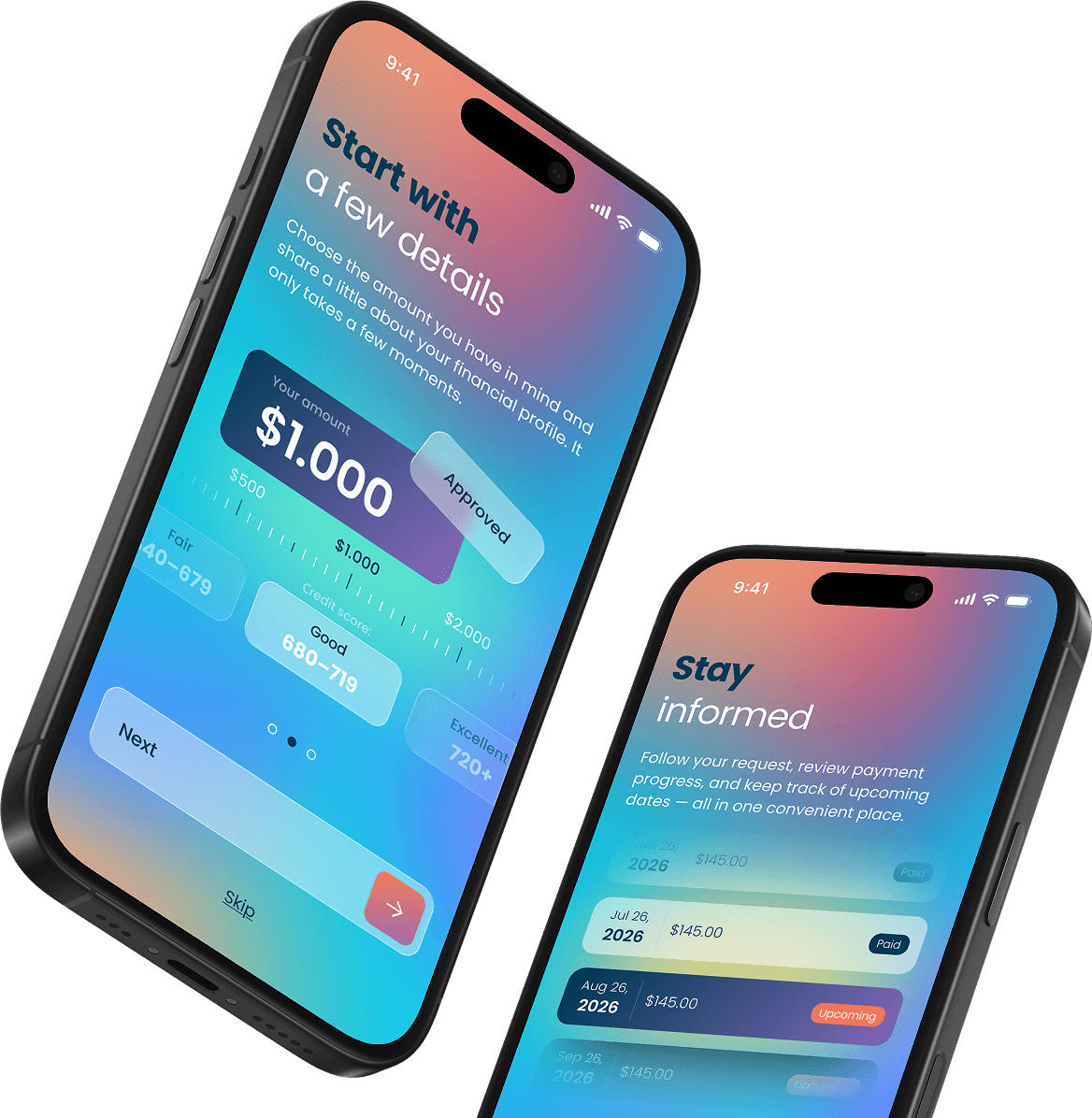
Your next financial step,
with the math already done.
Choose an amount. See the rate, the term, the payment, and the total cost side by side — before you agree to anything. Then watch every payment land exactly where the app said it would.
 Checking your options doesn't affect your credit score
- Your payoff date appears on the very first offer screen
- $0 application fee · $0 origination fee · $0 prepayment penalty

Money
from $500 to $5,000
Terms
from 3 to 24 months
APRs
from 12.00% to 35.99%

Most money apps show you the payment. We show you the whole picture.
There's a reason borrowing feels stressful. The number you actually need — what this will cost you in total, by the time it's finished — is usually the last thing anyone tells you, and it's usually in gray nine-point type at the bottom of a screen you've already scrolled past.
Tavro Advance was built on the opposite instinct. Put the uncomfortable numbers first, in the largest type on the page, before anyone signs anything. If an offer doesn't look good in daylight, you should find that out in ten seconds — not in ten months.
Every decision here comes down to three numbers, and we never separate them.
1
What you get
The principal. The amount that actually lands in your account, with nothing deducted on the way in.
2
What you pay each time
The scheduled payment, on a date you picked, on a cadence you chose.
3
What it costs you in total
Every payment added together. The one number that tells you whether this was a good idea.
Plenty of apps will show you number two. A few will show you numbers one and two.
Tavro shows all three on the same card, in the same size type, every single time — because a payment without a total is a sales pitch, and a total without a payment is a scare tactic.
Four things that make this different
1
Total cost, not just the monthly
Stretch the term and the payment gets smaller while the total gets bigger. That's not a discount, it's a trade — and the app labels it as one. You'll see both numbers move together, in real time, as you slide the term.
2
A soft check to look around
Seeing what you may qualify for uses a soft inquiry, which doesn't affect your credit score. A hard inquiry happens only if you choose to move forward with a specific offer, and the app puts a full-screen notice in front of you at the exact moment that changes.
3
One screen for the whole balance
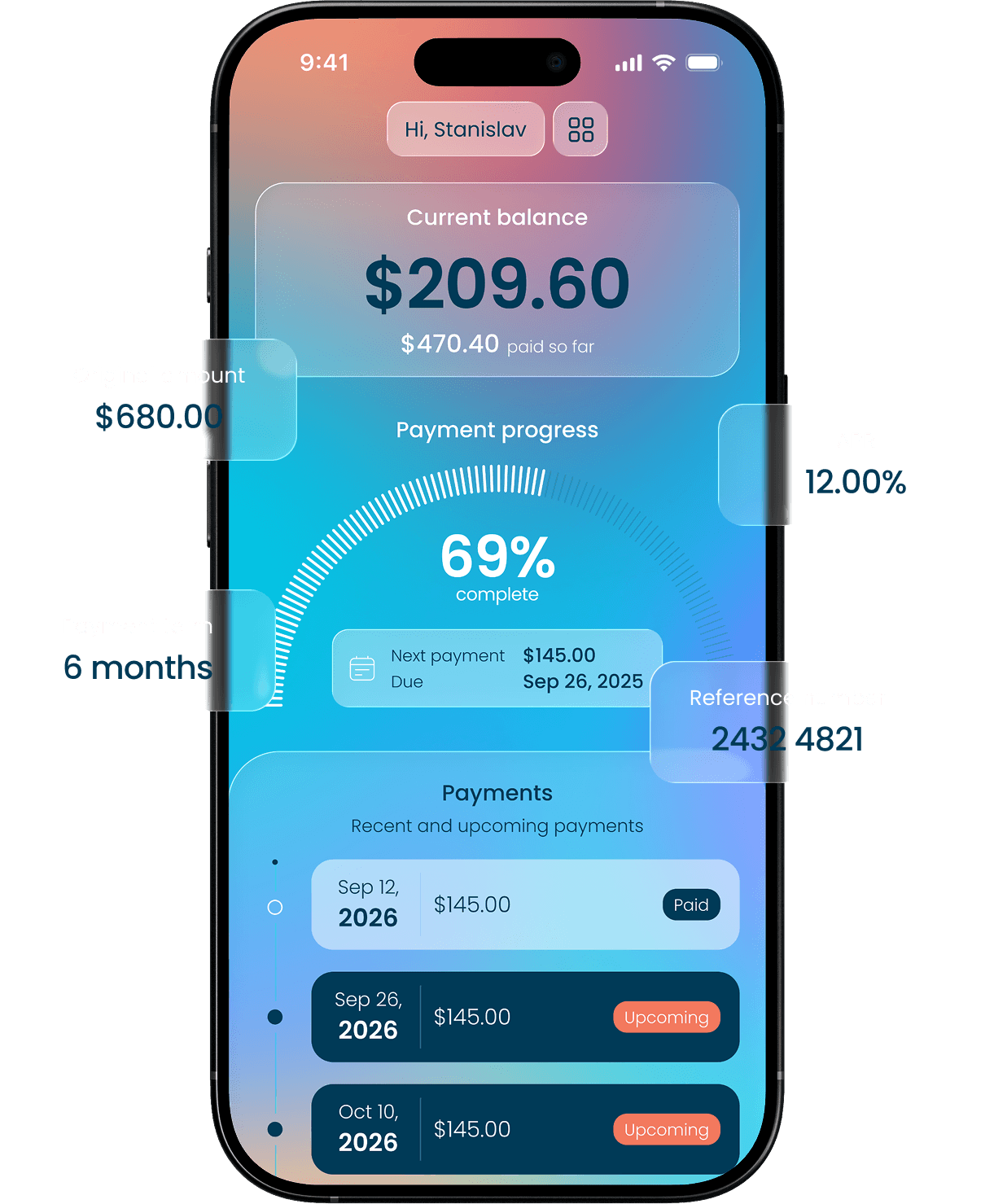
No hunting through statements. Balance, amount paid, percent complete, next due date, and the full payment schedule live on a single screen that updates as payments post.
4
A fee schedule short enough to read out loud
No application fee. No origination fee. No prepayment penalty. No monthly service charge. The two fees that can ever apply are listed in The Fine Print below, with the exact dollar amounts.
What we don't do.

We don't roll your balance into a new advance when you're struggling. That's how a six-month obligation becomes a three-year one.
We don't auto-renew anything. This product ends on a date, and that date is visible from the first screen.
We don't charge you to pay us faster.
We don't sell your personal information.
We don't use countdown timers, fake scarcity, or '3 people are viewing this.' You're making a financial decision, not buying concert tickets.
We don't bury the total. If you can find a screen where the payment appears without the total next to it, tell us and we'll fix it.
The Usual Experience

 Amount, payment, and total togetherOn the offer cardShown as a calendar dateSoft inquiry, no score impactAlways free, with savings previewTwo fees, both printed on this page
None of this is a clever trick of design. It's just information that should have been at the top all along.
Start with the amount you actually had in mind.
Most applications begin by asking you for everything and telling you nothing. Ten screens of personal history, and only then — after you're invested enough not to quit — a number.
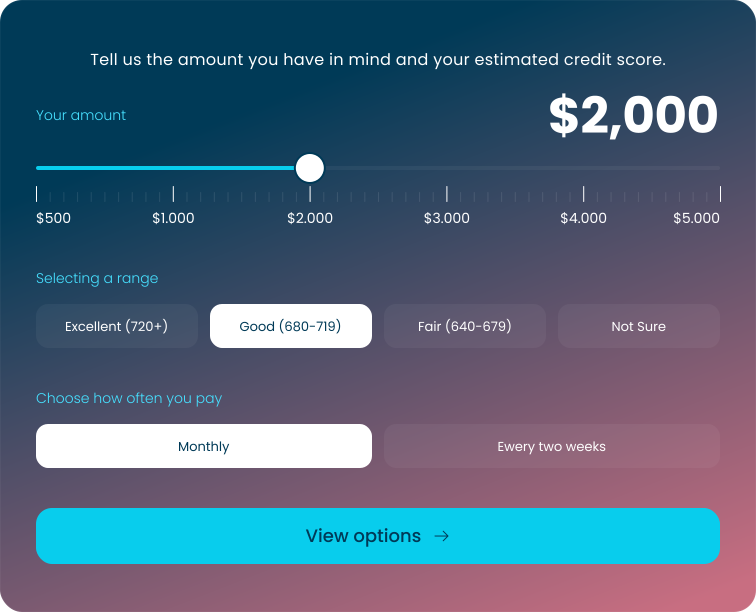
Tavro runs it backwards. Move the slider to your amount, pick the credit range that sounds about right, tap once. The app shows you what's realistic before it asks for your name. No documents, no account, no commitment — just an honest first look at whether this is even worth your time.
How it works

Monthly — one payment per month, on a date you choose. Simplest to track, easiest to budget around a single paycheck.
Every two weeks — smaller amounts, twice as often, matched to a biweekly pay cycle. Many people find this dramatically easier to absorb, because the payment never has to survive three weeks in a checking account before it's collected.
"I don't know my credit score."
That's the most common answer we get, and it's not a problem. Pick the closest guess and keep moving. Tavro uses your selection only to shape the preview you see on the next screen. Your real options come from a soft credit review of your actual file — not from the button you tapped.
An offer you can actually evaluate.
An offer is a set of trade-offs wearing the costume of a single number. Tavro takes the costume off. Every option you receive is presented with the same six fields, in the same order, in the same type sizes — so comparing two paths takes seconds instead of a spreadsheet, and so no option can hide behind a friendlier layout than the one next to it.
Tavro Approved Offer
1. Amount
The exact principal that lands in your account. No origination fee.
$1,500
2. APR
Folds interest rate and finance charges into one comparable figure.
14.5%
3. Term
How many payments, over how long. Stated as: '12 payments over 12 months'.
12 Months
4. Payment
The amount collected on each scheduled date, to the cent.
$135.08
5. Total of payments
Every scheduled payment added together. Start to finish cost.
$1,620.96
6. Payoff date
An actual calendar date, not just '24 months'.
November 14, 2026

Tavro Finance Glossary
Principal
The actual core amount borrowed that lands in your bank account, on which interest is computed.
Total of Payments
Every single monthly or biweekly payment added together from start to finish.
Soft Inquiry
A credit report check that doesn't impact your credit score, used for previews.
Interest Rate vs. APR
Interest rate is the cost of borrowing; APR includes other fees and charges expressed as a yearly rate.
Amortization
The schedule that breaks down how each payment goes toward both reducing principal and interest.
Hard Inquiry
A credit check that can impact your score, done only with explicit consent during signing.
"If none of the options are right for you, the correct move is to close the app. We'd rather you walk away informed than sign something confused."
A customer who understood the deal is worth more to us than one who didn't.
From 'approved' to 'paid off,' on one screen.
The anxious part of borrowing isn't the application. It's the nine months afterward, when you're not entirely sure what's left, whether last week's payment went through, or what's coming out on Thursday. That uncertainty is where most of the stress actually lives — and it's the specific problem the Tavro home screen was designed to solve.
A day in the life of your account
Tuesday morning
You open the app out of mild anxiety. The first thing on screen is your current balance in large type — $209.60 — with $470.40 paid so far directly underneath. Two seconds, and the anxiety is gone. You close the app.
The following Monday
A notification, three days before your payment date: $145.00 will be collected on Sep 26 from your account ending 4821. You have three days to move money if you need to. You don't.
Thursday
The payment posted. Your progress ring moved from 62% to 69%. The Sep 26 row in your timeline flipped from Upcoming to Paid. You didn't have to check — but you did, and it took four seconds.
Five months later
The ring hits 100%. Your status badge changes from Active to Paid off, and the payoff confirmation lands in your inbox the same day.
Notifications that earn their place
Everything else is off by default. You can turn any off individually except returned-payment alerts.

Lead time warning
Three days before a scheduled payment, with the amount and the account
Insufficiency alert
The morning of, if funds look like they may be short
Receipt notice
When a payment posts successfully
Return recovery
If a payment is returned, immediately, with what to do next
Milestone alerts
When you cross 50% and when you hit 100%
Payment and balance updates can take up to three business days to appear, depending on your bank. When something is still settling, the app says 'Processing' rather than showing you a number it isn't sure about yet.
The features that quietly keep you out of trouble.
Good outcomes aren't mostly about willpower. They're about knowing what's coming, and having somewhere to turn before a small problem becomes an expensive one. Almost every bad borrowing story starts the same way: something changed, the person waited, and by the time they reached out there were fewer options left.

Stay on schedule
Making payments by their due dates can help you avoid additional fees and keep your account in good standing.

Review upcoming dates
Check your payment schedule regularly so you always know what's due next.

Keep enough funds available
Make sure your selected payment account has sufficient funds before each scheduled withdrawal.

Check your account activity
Review recent payments and balance updates to make sure the information is accurate.

Plan ahead
If you expect difficulty making an upcoming payment, use the contact information in your agreement as early as possible.

About your account
Payment and balance updates may take some time to appear.
The questions people actually ask us.
No evasive industry definitions, no nested legal loops. Just clear, functional answers to exactly how this advance operates.
Will checking my options hurt my credit score?
No. Viewing your options uses a soft credit inquiry, which has no effect on your score, and you can do it as many times as you like. A hard inquiry may occur only if you choose to move forward with a specific offer — and a full-screen notice appears before that point.
How much can I request?
Between $500 and $5,000. What you're actually offered depends on your credit profile, income, state of residence, and other eligibility criteria. Not all applicants qualify, and not everyone qualifies for the full amount they request.
What are your rates?
APRs range from 12.00% to 35.99%, depending on your credit profile, the amount, the term, and applicable state law. Your exact APR appears on your offer, before you accept — never estimated, never revealed afterward.
What terms are available?
From 3 to 24 months, with payments either monthly or every two weeks. Both cadences are shown with identical information so you can compare them honestly.
What does it cost besides interest?
No application fee. No origination fee — the amount you're approved for is the amount that arrives. No prepayment penalty. No monthly service fee. Only two fees can ever apply: a $15 late fee after a 10-day grace period, and a $15 returned payment fee — both only where state law permits.
How fast does the money arrive?
Most approved advances are funded the next business day. Applications approved and signed before 2:00 PM ET on a business day are often funded the same day. Final timing depends on how quickly your bank posts incoming transfers, which is genuinely outside our control.
What do I need to qualify?
You must be at least 18 (19 in Alabama and Nebraska), a U.S. resident with a valid Social Security number or ITIN, have verifiable income, an active checking account in your name, and a valid email address and U.S. mobile number. Meeting these doesn't guarantee approval.
Can I pay it off early?
Yes, always, with no penalty. Use the payoff view in the app to see exactly what you'd save in interest and how far the payoff date moves. Pay in full at any point and you owe the remaining principal plus interest accrued to that day.
What happens if I miss a payment?
You'll get a notification the same day and a reminder at day three. A $15 late fee may apply after a 10-calendar-day grace period, where state law permits. A payment reaching 30 days past due may be reported to the credit bureaus. Reach out before any of this happens and there are more options available.
Why does my balance look unchanged after I paid?
Payments can take up to three business days to post, depending on your bank. During that window the app shows "Processing" rather than a number it can't confirm. If a payment still isn't reflected after three business days, contact support with your reference number and we'll trace it.
Is this a credit card or a line of credit?
Neither. It's a fixed-schedule product with a set number of payments and a known payoff date. Nothing revolves, nothing renews, and no balance carries forward into a new obligation.
Do you serve my state?
Availability varies by state, and so do maximum amounts and permitted fees. The app confirms availability for your state in the first screen after you enter your ZIP code — before you provide any personal information.
Does this help my credit?
It can. We report payment history to one or more of the three nationwide credit bureaus, so consistent on-time payments may support your credit profile over time. The same reporting means missed payments can hurt it. Neither outcome is guaranteed, since your score reflects many factors beyond this account.
Can I have more than one advance at a time?
No. One active advance per customer. If you need more than you currently have, the honest answer is usually that a second obligation isn't the solution — and we'd rather say that than sell you one.
How do I close my account or delete my data?
Email support@tavroadvance.com. If your balance is paid off, we'll close the account and confirm in writing. For data deletion, we'll tell you exactly what's removed immediately and what must be retained under federal and state recordkeeping rules, with the specific timeline for your file.

Our client
Tavro Advance

Look at your numbers. Decide after.
It takes about a minute to see what's realistic, and it costs you nothing — not a document, not an account, not a point on your credit score. Worst case, you find out this isn't the right move and you close the app better informed than you opened it.
Soft check only · $500–$5,000 · APR 12.00%–35.99% · No fees to apply, no penalty to finish early